Bridging the gap - Running an SLI setup without bridge connector on ForceWare 77.72
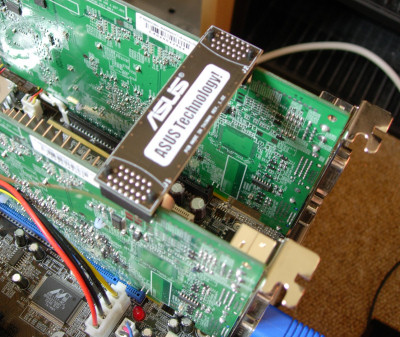
With the release of the GeForce 7800 GTX earlier this week, the focus was understandably concentrated around the launch of this new high-end part. This excitement has, largely speaking, allowed the release of a set of drivers to accompany this new part to go unnoticed.
As well as support for NVIDIA's new board, ForceWare 77.72 includes some interesting features from an SLI standpoint, most notably the introduction of support for 'vanilla' GeForce 6600 boards. As any of you who have seen such a board will testify, these cards come without the SLI bridge connector which will be familiar to most of you. On top of this, NVIDIA have also stated that devices can now be run in SLI without using this bridge connector, albeit with reduced performance.
With this intriguing development in mind, we decided to take a couple of GeForce 6600GTs, pair them up in SLI mode, and see how they performed using this new driver set both with and without the SLI bridge connector attached. Other sites have tried this in the past using previous driver sets, with , so will we have any better luck using ForceWare 77.72?
Test setup
Before we do any testing, let's take a look at the system we will be running our testing on.
Athlon64 3500+ (Socket 939)
ASUS A8N-SLI motherboard
1GB Corsair TwinX PC3200 RAM (2-2-2-5 memory timings)
37GB Western Digital Raptor hard drive
16x Pioneer DVD-ROM
2 x Leadtek GeForce 6600GT (PCI Express 16x)
The system in question was running Windows XP Service Pack 2 with DirectX 9.0c, and all testing was run using NVIDIA's WHQL candidate ForceWare 77.72 driver.
The following benchmarks were used for testing:
3DMark05 Build 1.2.0 - Standard tests, fillrate tests, Pixel/Vertex Shader tests*
Far Cry v1.3.2 - Custom timedemo, Research level
Doom 3 v1.3 - The Tech Report custom timedemo
Half-Life 2, latest build - CUstom timedemo, Prison level
* Note that the NVIDIA driver used for this testing is not yet 3DMark certified due to its non-WHQL status. As we are only comparing performance between a single NVIDIA SKU here, this is not really an issue
Running without a bridge connector
To set up an SLI system minus the inter-GPU connector is simplicity itself - Simply install the ForceWare 77.72 drivers, and install the two video cards as you would in a standard SLI setup, except sans the connector. NVIDIA's drivers will detect and allow you to activate SLI mode as per normal, but upon rebooting to switch on SLI mode you will be greeted by the following screen (Clicking the message in question takes you to NVIDIA's web site).
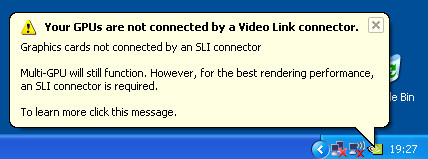
You're now ready to use SLI mode as per normal!
Testing
We begin our testing using 3DMark05, starting with the standard test at its default resolution and settings (Including leaving DST enabled). 3DMark05 makes use of NVIDIA SLI's AFR (Alternate Frame Rendering) mode, which scales both fillrate and geometry performance with SLI enabled.
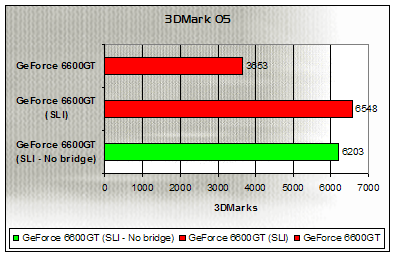
Over the course of the three standard tests which make up a final 3DMark05 score, performance is close between the SLI-enabled GeForce 6600GTs, regardless of whether or not the bridge connector is used - Indeed, removing the bridge only shows a drop of a few hundred points, and still leaves it well ahead of a single board. So far, so good for NVIDIA's theory.
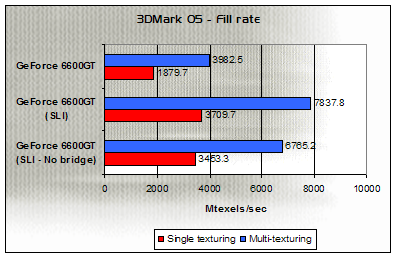
Using 3DMark05's fillrate test, we begin to see the inefficiencies of using an SLI setup minus the inter-GPU connector. Single-texturing fillrate remains comparable, but there is a deficit of 1000 MTexels/sec in multi-texturing performance when the bridge connector is not used.
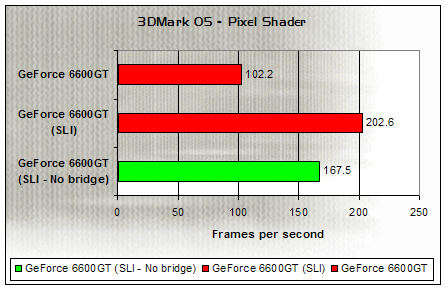
This fillrate deficit appears to carry over to the specific Pixel Shader test within the benchmark. Two 6600GTs without the bridge connector unsurprisingly beats out a single board, but trails 6600GTs in a 'true' SLI configuration by around 35 frames per second.
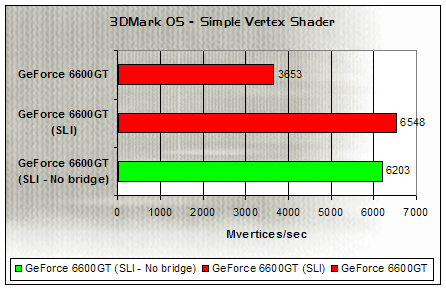

Without the inter-GPU connector, Vertex Shading also appears to be somewhat slower, although not be as huge a margin as we saw with the pixel shading test. Performance in both Vertex Shader tests is still way above a single 6600GT.
Let's move on from synthetic benchmarks now, and take a look at a handful of top real-world titles to examine performance. First, we'll be using Far Cry - This particular title is set to use a custom SLI profile within NVIDIA's drivers, which appears to be based around their SFR (Split Frame Rendering) mode. We've done all of our game testing using firstly 1024x768 with 4x anti-aliasing and 8x anisotropic filtering, followed by 1600x1200 without AA or AF. Far Cry was set to use the Shader Model 3.0 path for all testing.
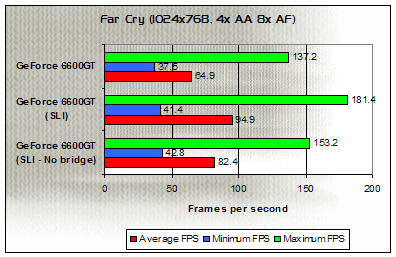
Starting at 1024x768 with anti-aliasing and anisotropic filtering, removing the inter-GPU connector loses around 12 frames per second from a properly set-up SLI configuration (just under 13% of performance), but still offers an improvement of 18 frames per second over a single 6600GT.
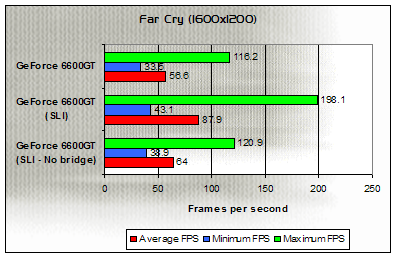
At 1600x1200, the effect of not using the bridge connector is far more severe, with this configuration holding only a small advantage (under 10 FPS) over a single 6600GT, whereas a true SLI configuration pulls opens up over a 20 frame per second gap over a non-bridged SLI setup. This equates to around a 37% performance drop.
Next stop is Half-Life 2, using our own custom timedemo in one of the games prison levels. Half-Life 2 uses the AFR mode of SLI to accelerate rendering in dual GPU mode.
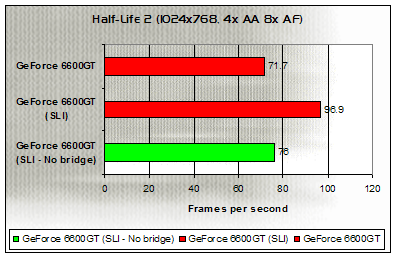
There isn't a lot to show between a single GeForce 6600GT and two boards minus the bridge connector at 1024x768 with 4x AA and 8x AF, giving only a 6% performance advantage whereas a true SLI setup pulls away to the tune of 20 frames per second.
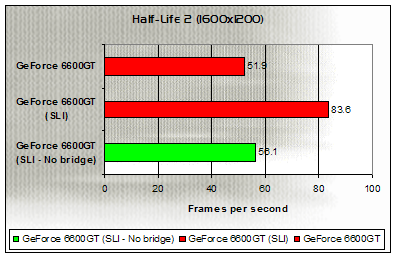
At 1600x1200, the story is the same - A non-bridged SLI setup barely managed to outperform a single 6600GT, while a proper SLI configuration streaks ahead.
The final game we'll be visiting in this examination is an OpenGL one, in the form of Doom 3. Much like Half-Life 2, this title too is set to use Alternate Frame Rendering in an SLI configuration.
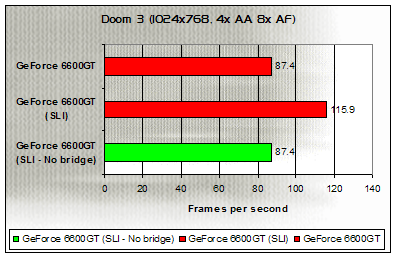
At 1024x768 with AA and AF, performance between a single 6600GT and a non-bridged SLI setup is, literally, identical - Showing no gains while a true SLI rig performs almost 30 frames per second better.
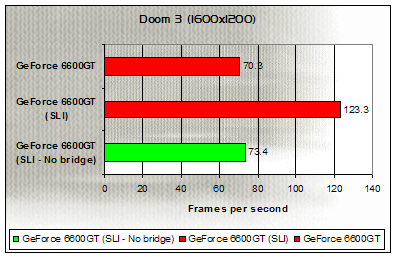
Things are little better at 1600x1200, with only a handful of frames separating two 6600GTs minus the inter-GPU connector from a single board, a massive 50 frames per second behind a complete SLI system.
Conclusions
From our brief round of testing, it does indeed appear that running in SLI without an inter-GPU connector is indeed functional in NVIDIA's driver set, however the results experienced in such a configuration vary greatly.
NVIDIA have in the past stated that the connector was required to send data to keep the two video cards rendering synchronised, as well as sending frame buffer data to the primary device to be displayed on screen - This thus saves transmitting all this data over the PCI Express bus and risk saturating the two 8-lane links which are available when SLI mode is enabled on the motherboard. This may well be the cause of some of the performance differences seen when the inter-GPU connector is disconnected, but is that the full story?
The answer is most likely no - With the news that the previously non-SLI supporting 6600 can now work in an SLI configuration, it seems likely that without the bridge connector fitted, the two devices are relying on a software-based form of SLI to deal with the organisation of transferring data to, from and between devices. Such a system will, naturally, put more strain on the CPU then the usual hardware-based system, and again may have a part to play in the performance degredation seen when no bridge connector is used. This also fits in with some of the patterns seen during our testing, where more naturally GPU-limited situations such as 3DMark's tests or Far Cry with anti-aliasing and anisotropic filtering enabled exhibit more advantage over a single board than 'straight' rendering setups such as 1600x1200 without AA and AF. Again, it seems unlikely that this is the entire story as to performance in such a configuration, but it may well play its part.
One of my other potential theories with regard to the performance we've seen was that the hardware load balancing inherent in the 6600GT (and indeed 6800 and 7800 boards) was being disabled when the bridge connector was not available, but this was proved to be false thanks to the ability to show load balancing on-screen while running OpenGL or DirectX content - Far Cry, which uses SLI's SFR mode as we mentioned earlier, clearly showed that load balancing was indeed in effect.
The same ability of NVIDIA's drivers also showed the difference in efficiency between running with and without the bridge connector beyond pure performance numbers. Click on the thumbnail below to view two photos, the first taken while running in 'true' SLI mode, the second minus the bridge connector.
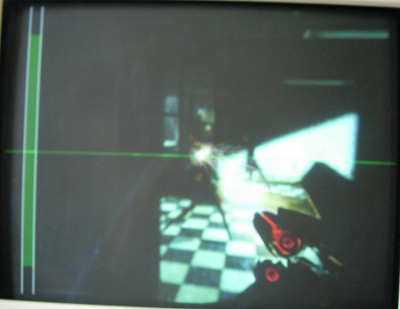
Click above for comparison images
Pay particular attention to the bar on the left-hand side, which shows the efficiency of SLI when running in AFR mode. It's clear to see that the bar is much smaller when running without the inter-GPU connector, making all the more apparant the inefficiencies of running in this fashion.
Overall then, it's hard to recommend to anybody to try running their existing SLI rig without the 'Video Link' connector - If you want to remove it permanently to install a hefty cooling solution, or you've lost the one that was shipped with your motherboard, forget it, to get true SLI performance you still need that connector. The bigger question is how two 6600 boards configured to use SLI in this way will cope - Do NVIDIA have a special profile or path for such cards with improvements over what we've seen here? One would hope so, but at the same time it seems somewhat doubtful considering what we've seen here. If we get hold of two 'vanilla' 6600 boards to test in an SLI configuration, we'll be sure to let you know our findings. Until then however, beware rushing out and purchasing two 6600s in the hope of getting a cheap SLI option until you get the full picture.
|